1. Log in to your cPanel account.
2. In the Databases section, click on MySQL Databases.

3. In the New Database field, enter a name for the new database you wish to create.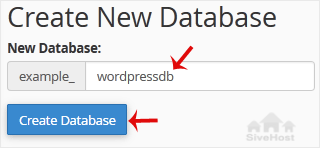
4. Click on Create Database.
- 0 Vhashumisi vho Wana hezwi zwi tshi Shuma
1. Log in to your cPanel account.
2. In the Databases section, click on MySQL Databases.
3. In the New Database field, enter a name for the new database you wish to create.
4. Click on Create Database.
1. Log in to your cPanel account. 2. In the Databases section, click on MySQL Databases. 3....
1. Log in to your cPanel account. 2. In the Databases section, click on MySQL Databases. 3....
1. Log in to your cPanel account. 2. In the Databases section, click on MySQL Databases. 3....
1. Log in to your cPanel account.2. In the Databases section, click on phpMyAdmin. 3. Click on...
1. Log in to your cPanel account.2. In the Databases section, click on phpMyAdmin.3. Click the...
Pfanelo dza u ṅwala © 2026 Tranos Web Technologies. Pfanelo dzothe dzo vhulungea.